Showing posts with label window tricks. Show all posts

Tuesday, November 22, 2011

google email phone mobile verification contact requirement

Problem
If you want to create a new Google email. They will ask for your mobile phone number.
This is Google security feature to prevent bot

Reason
Once, I read a blog (cant remember URL) about the phone verification only appear because of username you put. They will search for number or any repetitive name. If have, they will ask for phone verification

Solution
Thus the solution you need is simply putting a unique name. This is difficult since most of any name you try might already been taken.

So the solution for the solution is, "Elf name generator". Yes, Elf name is less frequently use in gmail so you will have high chance to get register new email without phone number verification

Here is some list of website that generate Elf name for you (You can find many website by simply searching "elf name generator"). Good luck in creating your new email... legolas
  1. http://elf.namegeneratorfun.com/
  2. http://online-generator.com/name-generator/elf-name-generator.php
  3. http://chriswetherell.com/elf/index.php
I do not responsible for broken link, these link are search through google on Nov 2011

That is all, your sincerely
Eärendur Fëfalas

Thursday, October 27, 2011

Limit download speed Free download manager

*21 September 2013 Update
If you using web browser to download and unable to use "Free download manager"
The alternative will be NetBalancer at http://seriousbit.com/netbalancer/
This is much advance technique where you need to limit manually "Firefox.exe" application into 100kbps as example


If you live in a "shared internet" environment and you don't want to be selfish by hogging all the bandwidth for download you can always cap the bandwidth

If you are using Torrent, be default they allow you to do so

But if you want to use normal download, you have to use download manager
Here I would recommend FDM; Free Download Manager

Download link here : http://www.freedownloadmanager.org/

They have a feature for limit the bandwidth but you have to set the speed manually
Basically I set

  1. Light mode = 20kBps max
  2. Medium mode = 50 kBps max
  3. Heavy mode = No limit


In Malaysia (normally or at least in my case)
20kBps download speed means you can play online game without lag or delay
50kbps download speed means you will lag in game, while okay for surfing website

Monday, May 23, 2011

Buy most optimum or worth it storage drive like hard disk or flash drive or pen drive

In these post I will share some equation about "Purchasing the most optimum hard disk / flash drive"

Im not sure is anybody already found out about these but I use these equation yesterday (already know about it along time ago but never get a chance to use it and update to blog)

The equation is

Optimum value = price / size

Where
price is the price of purchasing the hard disk
size is the hard disk size (like GB or TB)
The smallest value is the most 'optimum' or should I said 'most worth it'


How these calculation is made? How did I found out these equation?
Is based on example actually

Lets get through it!

Let say you went to shop and want to purchase a flash drive, here is the price list
50 GB = RM 100
100 GB = RM 200
150 GB = RM 300

Thus
100/50 = 2
200/100 = 2
300/150 = 2

These means, all are optimize, you can buy any size you want and they are all worth it


Example above is not the actual case, in flash drive and hard disk usually the

  • out dated will be very cheap
  • current will be normal
  • latest will be expensive


Like these
50 GB = RM 100
100 GB = RM 150
150 GB = RM 400

Thus
100/50 = 2
150/100 = 1.5 (lowest)
350/250 = 2.67

As you can see, the 100 GB will be the most worth it in this case
If the difference is like 0.1 means there is not much difference, unless you want to buy 99999 pieces. But still... 0.1?

Wednesday, April 27, 2011

Sysinternal - check window startup

Once upon a time, when I was still using Windows XP. I encounter alot of virus
Some of them able to delete manually and some of them does not (and so I format)

Here is one of the tool that I use to check any startup program (like virus or anything)
And it is a good tool because it scan deep down to the core (better than msconfig)

The software name was sysinternal
It is better (so far) from the most "checking window startup tool" application because most of them were just displaying just like what msconfig did

As for the download link, I cannot found the official website to download
Here is the might be can work (I didnt test it cause Im currently on Linux
http://technet.microsoft.com/en-us/sysinternals/bb842062
http://download.cnet.com/Sysinternals-Desktops/3000-2346_4-75077421.html

Why these software is good (to me) ?
  1. Most of startup software is no better than this (they just msconfig)
  2. Can use to remove virus
  3. Can use to improve window startup (especially when you remember the setting after format)

Screenshot

Thats all, hopefully its useful

Sunday, February 13, 2011

PC cannot start, backup data before format

This is common to Windows users, read cause it useful

Your window affected by virus (or anything) and cannot start. But you got important stuff in the partition and 'formatting' will delete the thing

Dont worry there is a way to "get it back before format" which is by using LIVE CD

Let me cut to the point else read the whole story

Use Ubuntu LIVE CD


What is LIVE CD?
It is like "installing operating system temporarily" and in these case I'm suggesting you to use "Ubuntu Live Pendrive"

What can you do with Temporary Operating System?
You will able to access the partition (as long as not corrupted or damaged) and take anything you want to save first

Real story, I have been helping 2 of my friend because of their PC cannot boot
These happen a long time ago but he remind me about it today

Why pendrive and does it possible?
  1. Yes, you only need 1GB pendrive (is already enough) and LIVE Pendrive is better in term of size and options.
  2. Notebook does not have CD/DVD ROM so pendrive is the solution

How to have these "Ubuntu LIVE Pendrive?"
  1. Go to these website and download it http://www.ubuntu.com/desktop/get-ubuntu/download
  2. Have a pendrive and make it bootable pendrive. The tutorial was on the download link
  3. Go to your "cannot start" PC, put the LIVE Pendrive and start, make sure to change your first boot to CD (I think to CD is already can be detected)
  4. The Ubuntu LIVE Pendrive will loading and you will be using Ubuntu to backup your data before formatting

Saturday, January 29, 2011

Write blog post using TinyMCE

Google blog text editor has improved!.They have "Edit HTML" or "Compose" tab (like below)


Thursday, January 20, 2011

Recover delete data or partition using testdisk & photorec

Related name
  • Recover deleted data
  • Recover data in deleted partition


From the last post (http://asipi.blogspot.com/2011/01/merge-harddisk-partition.html), the software have made my friend harddisk partition to go 'missing'. This is how I recover the data in the 'missing' partition back
Straight to the point, use testdisk & photorec link is here http://www.cgsecurity.org/wiki/TestDisk


If you are bored and want to read the whole story, proceed...

What is recovery and what is backup?
Both of them relate with 'keeping your data safe'. Backup is prevent while recovery is cure

Thus,

Backup
Save important data before your harddisk become corrupt

Recover
Get back important data after harddisk become corrupt

Backup is better than recover because, recover not guarantee 100% success but you will never know 'when to do the backup?'

This post focused on recovery
Okay, there is 2 software that I would like to suggest in recovery

1st software, Recuva
This is recommended by my friend and when I see it (not try) I do feel like this software is good. Here is the link http://www.piriform.com/recuva


2nd software, testdisk & photorec
This is the software that I want to promote actually. Here is the listed advantages that I know

Good detecting
Several software cannot detect corrupted harddisk. But this software can!. So when recover my friend harddisk it let me select the corrupted harddisk, the partition to recover

Harddisk format supported
There is alot of harddisk type it can support, typical that I still can remember is NTFS, FAT, Solaris (what is this?) and bla bla bla...

How good this recover?
It recover is 100% good. This is because they scan the harddisk by memory allocation.
Means as long as there is any single bytes in the harddisk will be scan. The problem was it was too good until unwanted data is also recover.
Chance of getting corrupted file is also high (because it was too good, seriously!)

*It cost RM 300 - RM 500 to recover you harddsik (in business). And knowing this cost you RM 1 (your electricity bill and time wasted to read)

Weakness
The first weakness but still not a 'real weakness' for me. Which is this program is in a commandline.Since im a programmer (and used to it), I'm going to said their commandline interface is excellent

Second weakness is it recover all the data as possible. Means your deleted file 1000 years ago is also possible as a result it highly corrupted. This is what happen if you want to perfection in recover

Saturday, January 1, 2011

Merge harddisk partition

Okay, It was happen I use ubuntu and make 2 partition (1 the main partition and the other 1 is the swap space)
But then I want to use Window again and 'hey!, the partition is separated. How do I merge it?'

So I'm doing some google and here is the website that solve my problem http://www.extend-partition.com/
They have Home Edition which is FREE

THEN, MY (FRIEND) 2ND PARTITION IS MISSING!!!!!!!!!!!!!

Saturday, September 25, 2010

Antivirus software, comodo

Here Im going to give opinion about anti virus software
Im using comodo internet security (free)
From here http://www.comodo.com/

If you are using kaspersky (need to pay). Im going to say yes kepersky is better
I have try bitdefender before this, still kaspersky is the best

If you want to use free anti virus software which is comodo
I going to tell you comodo has several classification in security

1. Anti virus
2. Internet security
3. Smart Defence+

what is this 3 things?

Antivirus
Is detect and remove virus
Its detect the virus when you open a folder or while performing a scan
After detect they will remove it
Not good antivirus software will not be able to detect a virus
Personally these comodo dont have a good antivirus so I dont install it

Internet security
It is a whole large topic with a purpose protect from Internet harm such as Hack, Spam etc etc. There is alot of way these guys do to hack so does security do to prevent. I install these feature in comodo

Smart Defense +
This is a new term in computer security. The base idea was a spam and telling you that these program abc.exe is running. Do you want to proceed? then you may decide yes or no.
Comodo are good enough to tell you that the program is safe. But still is depend on the situation. For an example, I was installing some game and they telling me is it?. If you are not computer literate you may suspect the game is a virus but most of the case, you know that what you do so you know that that is a game Im about to install so that was not a virus.
Basically this is the most important feature I need in my computer and the main reason why Im using comodo

Friday, June 11, 2010

Display and Disable Super hidden file

Yuu all know most of virus is hidden and the most typical way for them to infect you PC was through portable media like pen drive or portable harddisk.
I got alot of this case when I put my portable HDD to my friend. Luckyly I got antivirus to detect them but not to remove them.

The problem is the virus file is hidden and its not just typical hidden. Its a 'Super hidden file' where your 'Tool > Folder option > Show hidden file and folder' wont help at all.
So to encounter this you must use the command line aka cmd

So, type 'cmd' at run.

Navigate the 'cmd' into the portable media. In my case is typing 'I:' which direct me into I:\>


After that type 'dir /ah' and I see the virus! which is rfg.exe and his buddy autorun.inf.


The problem is I can see it in cmd but cant see in normal view.
So I disable their 'super hidden' using cmd by typing
'attrib -s -h -r rfg.exe' and 'attrib -s -h -r autorun.inf'

After typing these 2 things and It shows. So I delete them.

Just for friendly reminder. Never double click portable media. Right click and 'Explore' is the easy safest way.

Thats it, hope its usefull

*note
I just encounter another virus in my PenDrive but this method does not work
So this tutorial is not going to 100% solve your problem

Saturday, May 15, 2010

Install and bypass window media player 11 validation

If you using a pirate Window XP and inside it is using Window media player 9, you might be want to upgrade it into window media player 11.

THe problem is during the installation the installer will detect your Windows is a pirate version.

To encounter this problem I simply found an easy solution at http://www.tech-recipes.com/rx/2577/wmp11_install_windows_media_player_11_without_activating_bypass_wga/

window media player is a better player from window because of its lightweight and nice interface. Playlist and music manager is also available.

Well, from the link given I simply give a short tutorial (repeating the same thing)

1. Download the window media player 11 at microsoft website (image below is the installer I downloaded)


2. Extract the installer wmp11-windowsxp-x86-enu.exe


3. After extract, It supposed to looks liek this


4. Run the wmfdist11.exe


5. Run the wmp11.exe


6. Restart you PC

6. And the WMP 11 is installed

Thats it

Wednesday, May 12, 2010

Store Password Manager

If there a case you have a many password to remember, the only solution is by storing it.

When talk about storing password in you PC, there always be a security issue.

in this case, I'm using KeePass as a Password manager

KeePass is free and highly encrypted password manager. More feature is describe in the website

You can get the link here http://keepass.info/index.html

Sunday, March 14, 2010

By pass FLV to MP3 Converter 1.5 Trial

This only apply for a software called FLV to MP3 Converter


See how to get and use it here http://asipi.blogspot.com/2010/03/flv-to-mp3-converter-15.html

Keyword:
FLV to MP3 Converter 1.5 Trial by pass register
Skip FLV to MP3 Converter register

I'm usually listen for Trance from youtube. Since I like some of them very much, I rip it!.
After rip the FLV file I will convert it into MP3 using FLV to MP3 Converter 1.5.

This all went smoothly until the Software ask me to register aka Pruchase.
Thus, in this tutorial. It will simply tell you how to by pass FLV to MP3 converter Trial

How did I rip from youtube?
http://asipi.blogspot.com/2008/11/steal-streaming-video.html

Back to the topic, after using it for 20 times (in my case). It will ask you to register


There is a way to skip it

Open registry editor and Ctrl+F (Find) for word "flv2mp3Count"

Or by manual
HKEY_CURRENT_USER > Software > Microsoft > MSUpdate

After the searching is complete it should be displaying flv2mp3Count Value Data 20 in Decimal

This means, the software is checking the number of times you convert a flv into mp3. It it is more than 20 it will ask you to register


After that, double click "flv2mp3Count"
then click the "Decimal" and change the Value Data into 0

Press OK and start the "flv2mp3.exe" again it should be running fine


Additional note to make it simple.

This is some build in code i make to automatically change the registry just by clicking it
Which is using "Registry Editor".
Its already build in most of Window XP I believe.


First of all, open a new notepad.
Copy this code using and paste it into notepad


Windows Registry Editor Version 5.00

[HKEY_CURRENT_USER\Software\Microsoft\MSUpdate]
"flv2mp3Count"=dword:00000000


And rename the notepad file extension name from .txt into .reg


After saving. Double click it at it should look like this


Thats all,
Hope its useful... guess not

FLV to MP3 Converter 1.5

Keyword:
FLV to MP3 Converter
Convert FLV into MP3
FLV to MP3

In this tutorial. I will simply tell you what software did I use to convert .FLV file into .MP3 and how did I use it

As you all known, .FLV file come when you rip a video clip from youtube.
Since I'm ripping a music, the video does not matter so this is the part where I need a converter, into .MP3 file of course

If you been wandering how did I rip the Video Clip from youtube, See here http://asipi.blogspot.com/2008/11/steal-streaming-video.html

After using it for 20 times, you need to purchase it. So this is how i skip it
http://asipi.blogspot.com/2010/03/by-pass-flv-to-mp3-converter-15-trial.html

So, the software that I use to convert from .FLV into .MP3 is called "FLV to MP3 Convert" version 1.5

Please note that there are many software that allow file converting. This is just one of them

You may download it from here http://www.smallvideosoft.com/
After download, install it


Run the application


Select the .FLV file you want to convert
(Hold crtl while clicking the file to select multiple file)


Start converting


See your result


Extra note
I also use some other FLV to MP3 Converter and realize that this FLV to MP3 produce a low quality .MP3 (64kbps, where 128kbps for typical .MP3 music)
Or its because of the the default setting since I'm using it.

Thats all,
Hope its useful... guess not

Saturday, February 13, 2010

Windows shortcut

Windows logo key
Display or hide the Start menu

Windows logo key+L
Lock the computer

Windows logo key+BREAK
Display the System Properties dialog box

Windows logo key+D
Show the desktop

Windows logo key+M
Minimize all windows

Windows logo key+SHIFT+M
Restore minimized windows

Windows logo key+E
Open My Computer

Windows logo key+F
Search for a file or folder

CTRL+Windows logo key+F
Search for computers

Windows logo key+F1
Display Windows Help

Windows logo key+R
Open the Run dialog box

Windows logo key+U
Open Utility Manager

Monday, February 8, 2010

Reduce Firefox memory usage

Keyword:
Optimize Firefox memory
Firefox memory usage too high

In this chapter
I will simply teach how to reduce your Firefox memory usage.
Usually my Firefox can reach from 100k-300k memory usage. But with this, about 60-90k

Case
Im using Firefox 3.6
Window XP Home Edition SP 3
This tutorial is actually come from aviransplace

The Setting
But here my settings. You can custom it as you want.
Refer to the aviransplace to know what is the value should be put
1. At the address bar, type "about:config" and press enter
2. browser.cache.disk.capacity = 4096
3. browser.cache.offline.capacity = 4096
4. browser.sessionhistory.max_total_viewers = 2


Note
When using Firebug for developing website. I realize that the more error Firebug detect, the higher my memory consumption (and it does not go down).
To view current memory chache usage type "about:cache?device=memory" at addressbar

Additional settings.
Take a note that Firefox plug-in also can affect you memory usage.
You can check it ad Tools > Add-ons
In my case I only leave
Firebug 1.5.0
Flashblock 1.5.11.2
LogMeIn 1.0.0.496

Once done. My 1 tab with google page consume me 70k memory usage

Another additional setting
In case you want a ad hock browsing. It is best for you to keep a FF with a safemode start.
Simply duplicate the Shortcut of the FF
At the new Icon Right click > Properties
And add new words "-safe-mode"
It become like this

"C:\Program Files\Mozilla Firefox\firefox.exe" -safe-mode

Guess what. Its 55k memory usage

Update on 19 July 2010
Now Im using Google Chrome (most of the time) because of FF will run 1 .exe file just for flash. I didnt remember the name but it was on the task manager. This result a very high CPU consumption in my PC. I heard it was because of latest FF and this is still on a testing phase.

Update on 22 April 20110
I think these method is already obsolete and cannot be use anymore

Thursday, January 7, 2010

Flashblock

Flashlock is a Firefox add on that used to block all type of flash player.
Its let you to determine by your own to run the flash or not.

Benefit
Improve your internet speed since less data is loaded into your website page
Disable annoying advertisement

How do I get this?
Its in the Firefox add on website. Just search for "Flashblock"
Or simply click HERE
The installation should be easy for Firefox.

Here some example

Flashblock on FF Addon


Flashblock on the run

Friday, January 1, 2010

Disable yahoo messanger advertisement

Im using yahoo messenger 10. and this is how I disable their advertisement. AND ITS WORKING!

Please note that I have try many other way by googling such as editing the registry file and also downloading the tweak application.

And this method is available through many website either. So I just copy and paste the link HERE

Basically
At C:\Windows\system32\drivers\etc\hosts. Open the "hosts" with notepad.
And add "127.0.0.1 insider.msg.yahoo.com"

Please not that this method can also be use to disable a lot of thing. Once I saw they use it do disable the Adobe Professional pirate version from being black listed

Thats all,
Hope its useful... guess not

Saturday, November 22, 2008

Download Streaming Tube Video

Keyword.
Download stream video
Download tube video
Steal stream video
Steal tube video

In this Blog.
I will teach you "How to get streaming video"
The idea of stealing is actually get the stream video in your "Temporary" folder because the buffer video you watch is stored in that place.


For an example.
You like certain music clip in the youtube and you want it in your PC.
Of course there is a lot of way to get the clip by using application such as real player and youtube downloader.

But in this Blog, you will only use one application that is FREE and not related at all in term of media/download application which is "Unlocker"


What is unlocker?.
It is an application that allow you to delete on-run application. Like deleting certain file that cannot be delete because it is in used.


Condition to steal
1. The streaming video must be "Stream all". This means its buffer all the video, allowing you to replay or slide to any moment without buffering the video again. For an example, youtube.
( most of the sharing video website using this method )

2. It is assume the format for the video is .flv ( flash player ) since we don know the real format of the file. This means you need to know the format of the video that you want to steal
( most case is .flv, so don't need to worry much )

3. The video that you want to steal must be "complete". So if the video you choose is only half progress, then you only will get half. Therefore, wait the video to complete buffering and start stealing.


The step,
1. Download and Install the Unlocker
2. Find the "Temporary" folder
3. Find and locate the video
4. Retrieve the video


Step 1 - Download and Install the Unlocker
1.1 You can download this application easily such as www.download.com because it is FREE.
To make it easy, this is the link to Download the application :
http://www.filehippo.com/download_unlocker/
1.2 After download, install it. I'm not gonna teach about this part.
1.3 And finally, run he Unlocker application.

p/s: Magic star shape wand will occur on the bottom right (toolbar) once its running


Step 2 - Find the "Temporary" folder
To find the temporary folder is depend on your current user.
2.1 Go to start->run.
2.2 Type "cmd".
2.3 Type "%username%. in the CMD


You will know your Username once you do this.
Once you know your username, you can easily find the Temporary folder


Temporary folder is located at ( in my PC )
G:\Documents and Settings\asip\Local Settings\Temp


Note:
G: = is where I install my Windows
Documents and Settings\ = Default folder for Window XP
asip\ = My username, known from typing %username%
Local Settings\ = Default folder for Window XP
Temp\ = Default folder for Window XP


Step 3 - Find the video and locate it
Once you find the Temporary folder, don't close it.
Find the video you like and start watching it.

P/S : Once the video start buffering, it will appear a new file with random name .tmp extension (most of the case is .tmp). This file will keep expending its size through the video keep buffering. Therefore, notice the file and remember it for further step.


Please wait until the video to complete its buffering since retrieve the incomplete file result in incomplete video


Step 4 - Retrieve the video
Once is finish buffering.
Right click on the located video and you will see the "Unlocker" menu and click it.


Then choose "Copy" at the dropdown menu.
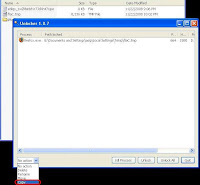

Allocate the file and rename it anyname with .flv as its extension file name.


Note added on 1 Jan 2010 (Happy new year!)
If u using Firefox, u can use "unplug" addon

Thats all,
Hope its useful... guess not