Keyword
FPDF °C become °C
FPDF °C problem
FPDF symbol problem
FPDF degree celsius temperature problem
I having a bug when I create a file from FPDF the character when wrong.
The wrong is the symbol where °C become °C
I try to change the FPDF font into UTF-8 by embedding UTF-8 font into it but still problem (my database and html page display the °C correctly)
after several experimenting cause googling is failed (4 hours of stress)
the reaseon is because of my page encoding. FPDF write into the paper using 'ISO-8859-1' encoding.
Thus UTF-8 is °C and when it write it become ISO-8859-1 which is °C
So long for the chatting lets cut to the point
use utf8_decode("°C") will solve your problem. It will convert UTF-8 to ISO-8859-1
HOpe this help cause 'quick googling' disappoint me
Just for my own reference to converting string
Tuesday, August 31, 2010


Javascript change dropdown or select option value which is index
I google for "javascript change select value" and turn out not really help full
The keyword for select is more like dropdown
while the value is index
So it must be "javascriptchange dropdown index"
The purpsoe of this post is a javascript is to change the selection inside the dropdown into something you want.
Just like the dropdown above. The default value is seet to the first option which is "Hello"
When I click a certain script with value "World", the script will change the dropdown into to "World". This is what I want. Below is the code
The keyword for select is more like dropdown
while the value is index
So it must be "javascriptchange dropdown index"
The purpsoe of this post is a javascript is to change the selection inside the dropdown into something you want.
Just like the dropdown above. The default value is seet to the first option which is "Hello"
When I click a certain script with value "World", the script will change the dropdown into to "World". This is what I want. Below is the code
function changeDropDown( dropdownidname, dropdownvalue)
{
var testingga = window.opener.document.EditView.elements[dropdownidname];
//In most case it will be document.getElementById(dropdownidname); I think
for (var i=0; i < testingga.length; i++)
{
if (testingga[i].value == dropdownvalue)
{
testingga[i].selected = true;
}
}
}
Tuesday, August 10, 2010
Web Graph
I surfing the net and come across with this http://www.rgraph.net
It provide you with a graph creation for website development. Pretty nice compared with JPGraph
Its a free for non business (only 1 time payment for business)
Friday, July 16, 2010
PHP Display array pre print_r into list button ul li
Related
Display array in list (collapsable)
Display array in print_r
Display array in list (collapsable)
Display array in print_r
Display array in ul li
Display array in pre
Usually in programming, when you debugging an array you will be using the pre and print_r
This is all right when the data is small. But if the array size is very large things will be hard which is happen to me lately.
So I create a function that display the array on the list. Plus this list is collapsible and it is a very simple code. Only 2 function needed
Usually in programming, when you debugging an array you will be using the pre and print_r
This is all right when the data is small. But if the array size is very large things will be hard which is happen to me lately.
So I create a function that display the array on the list. Plus this list is collapsible and it is a very simple code. Only 2 function needed
function thejavascriptrewrite(){echo "<script type='text/javascript'>";echo "function switchme( \$theId){\$theElement = document.getElementById(\$theId);if( \$theElement.style.display == 'none'){\$theElement.style.display = '';}else{\$theElement.style.display = 'none';}}";echo "</script>";}function arraytolist( $data, $iteration = 0, $fortheUL = null){$idName = "someCounterId";echo "<ul $fortheUL>";foreach( $data as $key => $value){if( !is_array($value)){echo "<li>";echo "[$key]=".$value;echo "</li>";}else{$iteration++;$totalArray = count( $value);echo "<li>"."<a onclick=\"switchme('$idName".$iteration."')\">$key ($totalArray)</a>";$forNextUL = "id='$idName".$iteration."' style='display: none;'";$iteration = arraytolist($value, $iteration, $forNextUL);echo "</li>";}}echo "</ul>";return $iteration;}
How to use?
paste this code
$data = array( 'abc', 'def', 'ghi');thejavascriptrewrite();arraytolist($data);
Tuesday, July 13, 2010
Jquery from Novice to Ninja
Sitepoint offer free Ebook "Jquery from Novice to Ninja" when Spain win the World Cup and I downloaded the Ebook (9MB) for free!
Saturday, July 3, 2010
HTML CSS Change Paragraph Spacing
I do some google to change my website design to change paragraph spacing and come across to this page. Its show the link that related to it
The site is http://answers.google.com/answers/threadview/id/783141.html
While the reference website is
All the link given is suggesting you to using css margin.
As for me, by using this already enough
The site is http://answers.google.com/answers/threadview/id/783141.html
While the reference website is
- http://lab.artlung.com/change-space-between-paragraphs/
- http://www.w3schools.com/css/css_margin.asp
- http://www.westciv.com/style_master/academy/css_tutorial/properties/margin.html
All the link given is suggesting you to using css margin.
As for me, by using this already enough
<p style="line-height: 200px;">Hello World</p>
Friday, June 11, 2010
Display and Disable Super hidden file
Yuu all know most of virus is hidden and the most typical way for them to infect you PC was through portable media like pen drive or portable harddisk.
I got alot of this case when I put my portable HDD to my friend. Luckyly I got antivirus to detect them but not to remove them.
The problem is the virus file is hidden and its not just typical hidden. Its a 'Super hidden file' where your 'Tool > Folder option > Show hidden file and folder' wont help at all.
So to encounter this you must use the command line aka cmd
So, type 'cmd' at run.
Navigate the 'cmd' into the portable media. In my case is typing 'I:' which direct me into I:\>
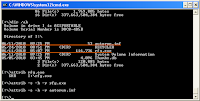
After that type 'dir /ah' and I see the virus! which is rfg.exe and his buddy autorun.inf.
The problem is I can see it in cmd but cant see in normal view.
So I disable their 'super hidden' using cmd by typing
'attrib -s -h -r rfg.exe' and 'attrib -s -h -r autorun.inf'
After typing these 2 things and It shows. So I delete them.
Just for friendly reminder. Never double click portable media. Right click and 'Explore' is the easy safest way.
Thats it, hope its usefull
I got alot of this case when I put my portable HDD to my friend. Luckyly I got antivirus to detect them but not to remove them.
The problem is the virus file is hidden and its not just typical hidden. Its a 'Super hidden file' where your 'Tool > Folder option > Show hidden file and folder' wont help at all.
So to encounter this you must use the command line aka cmd
So, type 'cmd' at run.
Navigate the 'cmd' into the portable media. In my case is typing 'I:' which direct me into I:\>

After that type 'dir /ah' and I see the virus! which is rfg.exe and his buddy autorun.inf.
The problem is I can see it in cmd but cant see in normal view.
So I disable their 'super hidden' using cmd by typing
'attrib -s -h -r rfg.exe' and 'attrib -s -h -r autorun.inf'
After typing these 2 things and It shows. So I delete them.
Just for friendly reminder. Never double click portable media. Right click and 'Explore' is the easy safest way.
Thats it, hope its usefull
*note
I just encounter another virus in my PenDrive but this method does not work
So this tutorial is not going to 100% solve your problem
Subscribe to:
Posts (Atom)