- So I was developing some PHP using netbeans 6.9.1 on my i3 ubuntu 10.10 laptop
- Then I realize the CPU process is too high causing my laptop to easily get hot
- I have been using netbeans 6.9 for a long time and no problem before
- This problem just occured and I not really sure the reason (either netbean update or ubuntu update?)
- Do some google and asking few friend, they said yes there is a report for this problem
- Anyway, the problem is solve once I install netbeans 7.2.1
Showing posts with label software. Show all posts
Showing posts with label software. Show all posts
Sunday, November 25, 2012
Net beans high CPU process
net bean high cpu process


Thursday, October 27, 2011
Limit download speed Free download manager
*21 September 2013 Update
If you using web browser to download and unable to use "Free download manager"
The alternative will be NetBalancer at http://seriousbit.com/netbalancer/
This is much advance technique where you need to limit manually "Firefox.exe" application into 100kbps as example
If you live in a "shared internet" environment and you don't want to be selfish by hogging all the bandwidth for download you can always cap the bandwidth
If you are using Torrent, be default they allow you to do so
But if you want to use normal download, you have to use download manager
Here I would recommend FDM; Free Download Manager
Download link here : http://www.freedownloadmanager.org/
They have a feature for limit the bandwidth but you have to set the speed manually
Basically I set

In Malaysia (normally or at least in my case)
20kBps download speed means you can play online game without lag or delay
50kbps download speed means you will lag in game, while okay for surfing website
If you using web browser to download and unable to use "Free download manager"
The alternative will be NetBalancer at http://seriousbit.com/netbalancer/
This is much advance technique where you need to limit manually "Firefox.exe" application into 100kbps as example
If you live in a "shared internet" environment and you don't want to be selfish by hogging all the bandwidth for download you can always cap the bandwidth
If you are using Torrent, be default they allow you to do so
But if you want to use normal download, you have to use download manager
Here I would recommend FDM; Free Download Manager
Download link here : http://www.freedownloadmanager.org/
They have a feature for limit the bandwidth but you have to set the speed manually
Basically I set
- Light mode = 20kBps max
- Medium mode = 50 kBps max
- Heavy mode = No limit

In Malaysia (normally or at least in my case)
20kBps download speed means you can play online game without lag or delay
50kbps download speed means you will lag in game, while okay for surfing website
Wednesday, April 27, 2011
Sysinternal - check window startup
Once upon a time, when I was still using Windows XP. I encounter alot of virus
Some of them able to delete manually and some of them does not (and so I format)
Here is one of the tool that I use to check any startup program (like virus or anything)
And it is a good tool because it scan deep down to the core (better than msconfig)
The software name was sysinternal
It is better (so far) from the most "checking window startup tool" application because most of them were just displaying just like what msconfig did
As for the download link, I cannot found the official website to download
Here is the might be can work (I didnt test it cause Im currently on Linux
http://technet.microsoft.com/en-us/sysinternals/bb842062
http://download.cnet.com/Sysinternals-Desktops/3000-2346_4-75077421.html
Why these software is good (to me) ?
Screenshot

Thats all, hopefully its useful
Some of them able to delete manually and some of them does not (and so I format)
Here is one of the tool that I use to check any startup program (like virus or anything)
And it is a good tool because it scan deep down to the core (better than msconfig)
The software name was sysinternal
It is better (so far) from the most "checking window startup tool" application because most of them were just displaying just like what msconfig did
As for the download link, I cannot found the official website to download
Here is the might be can work (I didnt test it cause Im currently on Linux
http://technet.microsoft.com/en-us/sysinternals/bb842062
http://download.cnet.com/Sysinternals-Desktops/3000-2346_4-75077421.html
Why these software is good (to me) ?
- Most of startup software is no better than this (they just msconfig)
- Can use to remove virus
- Can use to improve window startup (especially when you remember the setting after format)
Screenshot

Thats all, hopefully its useful
Sunday, February 13, 2011
PC cannot start, backup data before format
This is common to Windows users, read cause it useful
Your window affected by virus (or anything) and cannot start. But you got important stuff in the partition and 'formatting' will delete the thing
Dont worry there is a way to "get it back before format" which is by using LIVE CD
Let me cut to the point else read the whole story
What is LIVE CD?
It is like "installing operating system temporarily" and in these case I'm suggesting you to use "Ubuntu Live Pendrive"
What can you do with Temporary Operating System?
You will able to access the partition (as long as not corrupted or damaged) and take anything you want to save first
Real story, I have been helping 2 of my friend because of their PC cannot boot
These happen a long time ago but he remind me about it today
Why pendrive and does it possible?
How to have these "Ubuntu LIVE Pendrive?"
Your window affected by virus (or anything) and cannot start. But you got important stuff in the partition and 'formatting' will delete the thing
Dont worry there is a way to "get it back before format" which is by using LIVE CD
Let me cut to the point else read the whole story
Use Ubuntu LIVE CD
What is LIVE CD?
It is like "installing operating system temporarily" and in these case I'm suggesting you to use "Ubuntu Live Pendrive"
What can you do with Temporary Operating System?
You will able to access the partition (as long as not corrupted or damaged) and take anything you want to save first
Real story, I have been helping 2 of my friend because of their PC cannot boot
These happen a long time ago but he remind me about it today
Why pendrive and does it possible?
- Yes, you only need 1GB pendrive (is already enough) and LIVE Pendrive is better in term of size and options.
- Notebook does not have CD/DVD ROM so pendrive is the solution
How to have these "Ubuntu LIVE Pendrive?"
- Go to these website and download it http://www.ubuntu.com/desktop/get-ubuntu/download
- Have a pendrive and make it bootable pendrive. The tutorial was on the download link
- Go to your "cannot start" PC, put the LIVE Pendrive and start, make sure to change your first boot to CD (I think to CD is already can be detected)
- The Ubuntu LIVE Pendrive will loading and you will be using Ubuntu to backup your data before formatting
Sunday, January 30, 2011
GIMP save for web image optimize reduce size
If you are using Windows and want to upload huge picture size into the internet (or blog) optimize it first using Adobe Photoshop 'save image as web' feature. It can reduce image size and make your image to load faster!
Story
Im using ubuntu and they dont give adobe photoshop crack for free :(
But I need adobe photoshop 'Save image as web' feature.
Ubuntu only provide me 'GIMP' but I found the same feature as a plug-in
Straight to the source. I copy from here http://www.techzilo.com/install-save-for-web-gimp-plugin-ubuntu/
What is 'Save image for web' ?
Save image for web is a technology to compress the image size so it can load faster in the internet
Weakness
Reduce the image quality. But this wont affect much (unless you have super vision)
Advantages
Image load faster
Conclusion
The advantages overcome the weakness make this a good thing to share!
Others
I was kinda lazy to write the thing back cause the source it self is already 100% fool proof
Story
Im using ubuntu and they dont give adobe photoshop crack for free :(
But I need adobe photoshop 'Save image as web' feature.
Ubuntu only provide me 'GIMP' but I found the same feature as a plug-in
Straight to the source. I copy from here http://www.techzilo.com/install-save-for-web-gimp-plugin-ubuntu/
What is 'Save image for web' ?
Save image for web is a technology to compress the image size so it can load faster in the internet
Weakness
Reduce the image quality. But this wont affect much (unless you have super vision)
Advantages
Image load faster
Conclusion
The advantages overcome the weakness make this a good thing to share!
Others
I was kinda lazy to write the thing back cause the source it self is already 100% fool proof
Thursday, January 20, 2011
Recover delete data or partition using testdisk & photorec
Related name

From the last post (http://asipi.blogspot.com/2011/01/merge-harddisk-partition.html), the software have made my friend harddisk partition to go 'missing'. This is how I recover the data in the 'missing' partition back
Straight to the point, use testdisk & photorec link is here http://www.cgsecurity.org/wiki/TestDisk
If you are bored and want to read the whole story, proceed...
What is recovery and what is backup?
Both of them relate with 'keeping your data safe'. Backup is prevent while recovery is cure
Thus,
Backup
Save important data before your harddisk become corrupt
Recover
Get back important data after harddisk become corrupt
Backup is better than recover because, recover not guarantee 100% success but you will never know 'when to do the backup?'
This post focused on recovery
Okay, there is 2 software that I would like to suggest in recovery
1st software, Recuva
This is recommended by my friend and when I see it (not try) I do feel like this software is good. Here is the link http://www.piriform.com/recuva
2nd software, testdisk & photorec
This is the software that I want to promote actually. Here is the listed advantages that I know
Good detecting
Several software cannot detect corrupted harddisk. But this software can!. So when recover my friend harddisk it let me select the corrupted harddisk, the partition to recover
Harddisk format supported
There is alot of harddisk type it can support, typical that I still can remember is NTFS, FAT, Solaris (what is this?) and bla bla bla...
How good this recover?
It recover is 100% good. This is because they scan the harddisk by memory allocation.
Means as long as there is any single bytes in the harddisk will be scan. The problem was it was too good until unwanted data is also recover.
Chance of getting corrupted file is also high (because it was too good, seriously!)
*It cost RM 300 - RM 500 to recover you harddsik (in business). And knowing this cost you RM 1 (your electricity bill and time wasted to read)
Weakness
The first weakness but still not a 'real weakness' for me. Which is this program is in a commandline.Since im a programmer (and used to it), I'm going to said their commandline interface is excellent
Second weakness is it recover all the data as possible. Means your deleted file 1000 years ago is also possible as a result it highly corrupted. This is what happen if you want to perfection in recover
- Recover deleted data
- Recover data in deleted partition
From the last post (http://asipi.blogspot.com/2011/01/merge-harddisk-partition.html), the software have made my friend harddisk partition to go 'missing'. This is how I recover the data in the 'missing' partition back
Straight to the point, use testdisk & photorec link is here http://www.cgsecurity.org/wiki/TestDisk
If you are bored and want to read the whole story, proceed...
What is recovery and what is backup?
Both of them relate with 'keeping your data safe'. Backup is prevent while recovery is cure
Thus,
Backup
Save important data before your harddisk become corrupt
Recover
Get back important data after harddisk become corrupt
Backup is better than recover because, recover not guarantee 100% success but you will never know 'when to do the backup?'
This post focused on recovery
Okay, there is 2 software that I would like to suggest in recovery
1st software, Recuva
This is recommended by my friend and when I see it (not try) I do feel like this software is good. Here is the link http://www.piriform.com/recuva
2nd software, testdisk & photorec
This is the software that I want to promote actually. Here is the listed advantages that I know
Good detecting
Several software cannot detect corrupted harddisk. But this software can!. So when recover my friend harddisk it let me select the corrupted harddisk, the partition to recover
Harddisk format supported
There is alot of harddisk type it can support, typical that I still can remember is NTFS, FAT, Solaris (what is this?) and bla bla bla...
How good this recover?
It recover is 100% good. This is because they scan the harddisk by memory allocation.
Means as long as there is any single bytes in the harddisk will be scan. The problem was it was too good until unwanted data is also recover.
Chance of getting corrupted file is also high (because it was too good, seriously!)
*It cost RM 300 - RM 500 to recover you harddsik (in business). And knowing this cost you RM 1 (your electricity bill and time wasted to read)
Weakness
The first weakness but still not a 'real weakness' for me. Which is this program is in a commandline.Since im a programmer (and used to it), I'm going to said their commandline interface is excellent
Second weakness is it recover all the data as possible. Means your deleted file 1000 years ago is also possible as a result it highly corrupted. This is what happen if you want to perfection in recover
Saturday, January 1, 2011
Merge harddisk partition
Okay, It was happen I use ubuntu and make 2 partition (1 the main partition and the other 1 is the swap space)
But then I want to use Window again and 'hey!, the partition is separated. How do I merge it?'
So I'm doing some google and here is the website that solve my problem http://www.extend-partition.com/
They have Home Edition which is FREE
THEN, MY (FRIEND) 2ND PARTITION IS MISSING!!!!!!!!!!!!!
But then I want to use Window again and 'hey!, the partition is separated. How do I merge it?'
So I'm doing some google and here is the website that solve my problem http://www.extend-partition.com/
They have Home Edition which is FREE
THEN, MY (FRIEND) 2ND PARTITION IS MISSING!!!!!!!!!!!!!
Monday, October 4, 2010
Convert PDF into Excel or Words
I use Able2Extract Pro. Of course I download the Pirate one with the crack
Tuesday, September 28, 2010
Software Architecting Success Factors and Pitfalls
My boss give to my email so sharing it with myself
Software Architecting Success Factors and Pitfalls
The top critical success factors for the architecting effort that we have identified are:
The architecting effort must:
* address a strategic business objective of your key sponsor
* have a good lead architect with well-defined role and style
* have a lead architect and architecture team who are able to "sell" (lead); conversely, the organization must be willing to "buy into" (follow)
* contribute immediate value to developers (utilizers of the architecture)
The architecture is more likely to be successful if:
* there are architecture advocates at all levels of the organization
* architecture is woven into the culture
* there is customer involvement/pressure/demand
Critical Success Factors
* Interpersonal and team communication and ownership
* Leadership
* Vision
* Teamwork
* Availability of talent/resources
* Must have strong management sponsorship
* Market/business understanding
* Good match between technology and business strategy
* Customer focus
* Clear specifications including dependencies
* Simple architecture
* Deployed in phases/incrementally
* Architecture is understandable by all
* Solve at least the current problem
* Validation of requirements during each step of the process
* Project management
The architect must have the following skills:
* good domain knowledge
* good communicator/listener
* good persuader
* good project management skills
The architect must
* have a clear and compelling vision
* champion the cause
* provide constructive feedback
Pitfalls
* Poor leadership
* Thinking at too low a level
* Poor communication inside/outside the architecture team
* Not enough "selling"
* Lack of resources/talent
* Poorly designed roles and responsibilities
* Bad design/idea
* Lack of extensibility
* Doesn't solve the project team's problems
* Lack of control/authority
* Requirements unclear, not well-defined, not signed off, changing
* Architecture team loses touch with the product team's problems
* Product team believes "we can solve it better ourselves"
* Development management not penalized for "stalling"
* Politics
Software Architecting Success Factors and Pitfalls
The top critical success factors for the architecting effort that we have identified are:
The architecting effort must:
* address a strategic business objective of your key sponsor
* have a good lead architect with well-defined role and style
* have a lead architect and architecture team who are able to "sell" (lead); conversely, the organization must be willing to "buy into" (follow)
* contribute immediate value to developers (utilizers of the architecture)
The architecture is more likely to be successful if:
* there are architecture advocates at all levels of the organization
* architecture is woven into the culture
* there is customer involvement/pressure/demand
Critical Success Factors
* Interpersonal and team communication and ownership
* Leadership
* Vision
* Teamwork
* Availability of talent/resources
* Must have strong management sponsorship
* Market/business understanding
* Good match between technology and business strategy
* Customer focus
* Clear specifications including dependencies
* Simple architecture
* Deployed in phases/incrementally
* Architecture is understandable by all
* Solve at least the current problem
* Validation of requirements during each step of the process
* Project management
The architect must have the following skills:
* good domain knowledge
* good communicator/listener
* good persuader
* good project management skills
The architect must
* have a clear and compelling vision
* champion the cause
* provide constructive feedback
Pitfalls
* Poor leadership
* Thinking at too low a level
* Poor communication inside/outside the architecture team
* Not enough "selling"
* Lack of resources/talent
* Poorly designed roles and responsibilities
* Bad design/idea
* Lack of extensibility
* Doesn't solve the project team's problems
* Lack of control/authority
* Requirements unclear, not well-defined, not signed off, changing
* Architecture team loses touch with the product team's problems
* Product team believes "we can solve it better ourselves"
* Development management not penalized for "stalling"
* Politics
Saturday, September 25, 2010
Antivirus software, comodo
Here Im going to give opinion about anti virus software
Im using comodo internet security (free)
From here http://www.comodo.com/
If you are using kaspersky (need to pay). Im going to say yes kepersky is better
I have try bitdefender before this, still kaspersky is the best
If you want to use free anti virus software which is comodo
I going to tell you comodo has several classification in security
1. Anti virus
2. Internet security
3. Smart Defence+
what is this 3 things?
Antivirus
Is detect and remove virus
Its detect the virus when you open a folder or while performing a scan
After detect they will remove it
Not good antivirus software will not be able to detect a virus
Personally these comodo dont have a good antivirus so I dont install it
Internet security
It is a whole large topic with a purpose protect from Internet harm such as Hack, Spam etc etc. There is alot of way these guys do to hack so does security do to prevent. I install these feature in comodo
Smart Defense +
This is a new term in computer security. The base idea was a spam and telling you that these program abc.exe is running. Do you want to proceed? then you may decide yes or no.
Comodo are good enough to tell you that the program is safe. But still is depend on the situation. For an example, I was installing some game and they telling me is it?. If you are not computer literate you may suspect the game is a virus but most of the case, you know that what you do so you know that that is a game Im about to install so that was not a virus.
Basically this is the most important feature I need in my computer and the main reason why Im using comodo
Im using comodo internet security (free)
From here http://www.comodo.com/
If you are using kaspersky (need to pay). Im going to say yes kepersky is better
I have try bitdefender before this, still kaspersky is the best
If you want to use free anti virus software which is comodo
I going to tell you comodo has several classification in security
1. Anti virus
2. Internet security
3. Smart Defence+
what is this 3 things?
Antivirus
Is detect and remove virus
Its detect the virus when you open a folder or while performing a scan
After detect they will remove it
Not good antivirus software will not be able to detect a virus
Personally these comodo dont have a good antivirus so I dont install it
Internet security
It is a whole large topic with a purpose protect from Internet harm such as Hack, Spam etc etc. There is alot of way these guys do to hack so does security do to prevent. I install these feature in comodo
Smart Defense +
This is a new term in computer security. The base idea was a spam and telling you that these program abc.exe is running. Do you want to proceed? then you may decide yes or no.
Comodo are good enough to tell you that the program is safe. But still is depend on the situation. For an example, I was installing some game and they telling me is it?. If you are not computer literate you may suspect the game is a virus but most of the case, you know that what you do so you know that that is a game Im about to install so that was not a virus.
Basically this is the most important feature I need in my computer and the main reason why Im using comodo
Tuesday, August 10, 2010
Web Graph
I surfing the net and come across with this http://www.rgraph.net
It provide you with a graph creation for website development. Pretty nice compared with JPGraph
Its a free for non business (only 1 time payment for business)
Saturday, May 15, 2010
Install and bypass window media player 11 validation
If you using a pirate Window XP and inside it is using Window media player 9, you might be want to upgrade it into window media player 11.
THe problem is during the installation the installer will detect your Windows is a pirate version.
To encounter this problem I simply found an easy solution at http://www.tech-recipes.com/rx/2577/wmp11_install_windows_media_player_11_without_activating_bypass_wga/
window media player is a better player from window because of its lightweight and nice interface. Playlist and music manager is also available.
Well, from the link given I simply give a short tutorial (repeating the same thing)
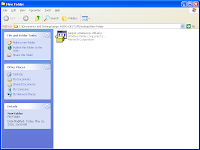
1. Download the window media player 11 at microsoft website (image below is the installer I downloaded)
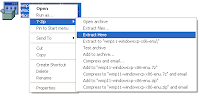
2. Extract the installer wmp11-windowsxp-x86-enu.exe
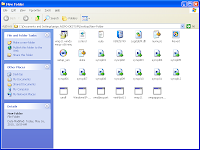
3. After extract, It supposed to looks liek this
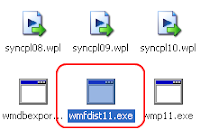
4. Run the wmfdist11.exe
5. Run the wmp11.exe
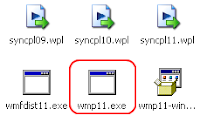
6. Restart you PC
6. And the WMP 11 is installed
Thats it
THe problem is during the installation the installer will detect your Windows is a pirate version.
To encounter this problem I simply found an easy solution at http://www.tech-recipes.com/rx/2577/wmp11_install_windows_media_player_11_without_activating_bypass_wga/
window media player is a better player from window because of its lightweight and nice interface. Playlist and music manager is also available.
Well, from the link given I simply give a short tutorial (repeating the same thing)
1. Download the window media player 11 at microsoft website (image below is the installer I downloaded)

2. Extract the installer wmp11-windowsxp-x86-enu.exe

3. After extract, It supposed to looks liek this

4. Run the wmfdist11.exe

5. Run the wmp11.exe

6. Restart you PC
6. And the WMP 11 is installed
Thats it
Wednesday, May 12, 2010
Store Password Manager
If there a case you have a many password to remember, the only solution is by storing it.
When talk about storing password in you PC, there always be a security issue.
in this case, I'm using KeePass as a Password manager
KeePass is free and highly encrypted password manager. More feature is describe in the website
You can get the link here http://keepass.info/index.html
When talk about storing password in you PC, there always be a security issue.
in this case, I'm using KeePass as a Password manager
KeePass is free and highly encrypted password manager. More feature is describe in the website
You can get the link here http://keepass.info/index.html
Subscribe to:
Posts (Atom)